Chapter 1: The Shift
"The biggest change isn't what software can do. It's who can build it — and how fast."
In this chapter
- Why 2024–2025 was a genuine inflection point for software development
- The difference between automation, orchestration, and agency — and why the distinction matters
- Why Power Platform professionals are uniquely positioned to lead this shift
- What this book is really about: not AI in your apps, but AI building your apps
Two Ways to Think About AI and Power Platform
There are two very different ways to bring AI into Power Platform development.
The first way is to build AI into your solutions — adding a Copilot Studio agent to your app, calling Azure OpenAI from a flow, embedding a chat widget in a Power Pages site. The AI becomes a feature.
The second way is to use AI to build your solutions — using Claude Code or GitHub Copilot to generate your data models, write your flows, scaffold your Canvas apps, build your Power Pages sites, and design your Copilot Studio agents. The AI becomes a team member.
This book is about the second way.
The distinction matters because the second way is a development practice, not a product feature. It changes how you work every day — how you start a new solution, how you iterate, how fast you can go from requirements to deployed application. It doesn't require a new license or a new architecture pattern. It requires a different habit: reaching for Claude Code or GitHub Copilot before you reach for the mouse.
The Inflection Point
Power Platform professionals have always built faster than their pro-code counterparts. That's the platform's value proposition: low-code tools that turn business expertise into working software, without a six-month dev cycle.
But until recently, "building faster" still meant doing most of the work manually. You drag controls. You write Power Fx. You configure columns in Dataverse. You map conditions in flows. You write Liquid templates in Power Pages. Even for experienced makers, these tasks take time — and the cognitive load of remembering syntax, connector behavior, and schema details adds up.
What changed in 2024 wasn't just that AI got better at generating code. It's that AI became genuinely useful for the specific kinds of things Power Platform developers build:
- Natural-language descriptions turning into Dataverse table schemas
- Process descriptions turning into working Power Automate flows
- Screen layouts scaffolded from a one-line prompt
- Liquid templates generated from a description of what the page should do
- Power Fx formulas written from a plain-English explanation of the logic
The gap between "I know what I need to build" and "I have something working" collapsed.
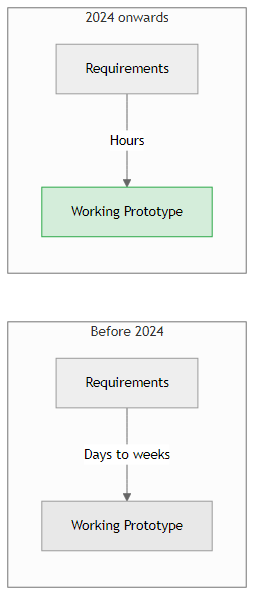
Figure 1.1 — The time compression isn't incremental. For well-scoped Power Platform work, AI assistance has collapsed prototype time by an order of magnitude.
Three Mental Models Worth Getting Right
Before we get into tools and techniques, three concepts need to be clearly separated. They get conflated constantly, and the confusion leads to bad decisions about where AI fits in your work.
Automation
Automation is if-this-then-that at scale. A Power Automate flow that sends an email when a SharePoint list item is created is automation. It is deterministic, repeatable, and defined entirely by the person who built it. There is no reasoning. There is no judgment.
Automation is enormously valuable. This book will help you build a lot of it — faster than you could before, because AI writes much of the logic. But automation has a ceiling: it can only do what you anticipated when you built it.
Orchestration
Orchestration coordinates automation across systems. A multi-step flow that pulls data from Dynamics 365, enriches it with an API call, writes results to Dataverse, and triggers a Teams notification is orchestration. More complex, still deterministic.
Most mature Power Platform solutions are orchestration — sophisticated, multi-step, multi-system pipelines. AI can generate these significantly faster than manual development.
Agency
Agency is where AI moves from a tool you use to a collaborator who acts. An agent has a goal and a set of tools. It reasons about how to achieve the goal, takes action, observes results, and decides what to do next — without you specifying every step in advance.
Claude Code is an agentic system. When you ask it to "build a Dataverse data model for a field service management app," it doesn't just generate a table. It reasons about what tables a field service app needs, what relationships exist between them, what columns matter, what lookup fields are required — and it builds across all of those decisions in sequence, adapting as it goes.
This is the behavior that makes it feel like a developer, not a search engine.
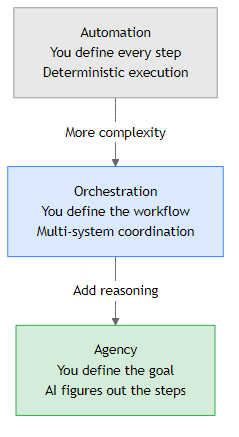
Figure 1.2 — The three levels. This book uses AI at all three levels: automating repetitive generation tasks, orchestrating multi-step build workflows, and leveraging agent reasoning for complex design decisions.
Why Power Platform Professionals Are Uniquely Positioned
There's a common assumption that AI-assisted development is primarily a pro-code developer's story — that you need to be writing Python or TypeScript to benefit. This assumption is wrong.
Power Platform professionals bring three things to AI-assisted development that many traditional developers lack:
1. Deep Business Process Knowledge
You understand why a business does things, not just what it does. When you prompt Claude Code to build a claims processing solution, you already know what tables exist, what the approval chain looks like, what fields are required, and what the edge cases are. That context makes your prompts precise and your AI output immediately relevant.
A developer learning your domain from scratch would spend weeks gathering requirements. You start with them.
2. The Full Power Platform Ecosystem
You know Dataverse, Power Automate, Canvas Apps, Power Pages, Copilot Studio, and the connector ecosystem. When Claude Code generates something that doesn't quite fit, you know why — and you can tell it why. When it suggests a pattern that conflicts with your DLP policy or your environment strategy, you catch it.
This domain knowledge is the quality gate that makes AI-generated Power Platform code actually deployable.
3. Governance and ALM Literacy
You know about managed solutions, environment variables, connection references, DLP policies, and deployment pipelines. These aren't optional concerns — they're what separates a prototype from a production system. AI-assisted development without governance literacy produces impressive demos that can't ship. You already have the governance literacy.
Critically, you understand solutions as the unit of governance. Everything AI generates — tables, flows, Canvas apps, pages, agents — must land in a named, publisher-prefixed solution before it can be reviewed, tested, and promoted as a managed solution to UAT and Prod. That mental model is what makes AI-generated assets deployable, not just runnable. A developer who learned to use Claude last week doesn't have it.
What this book adds is the practice layer: how to direct AI tools effectively, how to review what they generate, and how to build a development workflow where Claude Code and GitHub Copilot are genuinely accelerating your work rather than creating new problems.
What This Book Is About
This book is not about building AI features into Power Platform applications (though Chapter 11 covers that as one technique among many).
This book is about using AI to build Power Platform applications — faster, more consistently, and with higher quality than you could achieve working alone.
Specifically, it covers:
- Claude Code and GitHub Copilot as your primary development partners
- Building everything with AI assistance: data models, flows, Canvas apps, Code apps, Power Pages sites, Copilot Studio agents
- Writing your own skills: teaching Claude Code your environment, your patterns, your conventions
- Governing AI-generated assets: reviewing, testing, and deploying what AI builds
- Scaling the practice: moving from solo AI assistance to team-wide AI development workflows
By the end of this book, you won't be asking "should I use AI to help with this?" You'll be asking "what's the fastest way to direct AI to build this?"
The Running Thread
Rather than a single scenario that evolves through every chapter, this book takes a different approach: each Part II chapter (Chapters 3–9) builds a complete, standalone Power Platform asset using AI assistance. The through-line is a field service management app — each chapter adds a layer to the same solution. By the end of Part II, you'll have built:
- A Dataverse data model for a field service management app (Ch3)
- Work order assignment and completion notification flows (Ch4)
- A Canvas app for field service technicians — work orders, service locations, parts (Ch5)
- A Code App (React + Vite) dispatcher management dashboard (Ch6)
- A Power Pages partner extranet — classic portal and Code Site versions (Ch7)
- A Copilot Studio internal HR support agent (Ch8)
- A custom skill library that encodes your environment's conventions (Ch9)
Each of these is a real, deployable asset — not a toy demo. The goal is that by the end of Part II, you have a complete working solution you can reference, adapt, and use as a template for your own projects.
- This book is about using AI to build Power Platform, not about building AI into Power Platform. The distinction matters. One is a feature; the other is a practice.
- Automation, orchestration, and agency are three different things. Most of what AI builds for us is automation and orchestration. Understanding agency explains why Claude Code behaves like a developer rather than an autocomplete tool.
- Power Platform professionals have a significant advantage in AI-assisted development: business process knowledge, ecosystem familiarity, and governance literacy. These are not replaceable by a developer who learned to use Claude last week.
- The gap between requirements and working prototype has collapsed. The question is no longer whether AI can help — it's whether you're directing it effectively.
What's Next
Chapter 2 is where we set up. We'll install Claude Code and GitHub Copilot, connect them to your Power Platform environment via the Dataverse MCP server and PAC CLI, and run your first AI-generated Power Platform asset from scratch — before you've written a single formula or dragged a single control.